Two taps, not twenty fields
Book hours or update a job in seconds, standing at the machine.
Jump to a screen, or run an action you are permitted to run.
Mining CMMS · yours to own
Kimberlite is built to stay out of the way of the work: two taps to record hours, plain language, and entries that save on the device when there's no signal. We fit it to how your site already runs, and you own what we build.
Why CMMS rollouts fail
Off-the-shelf systems can be configured, but they're still built for everyone, so your workflow ends up bending to the software. Crews work around it during time-critical jobs, the records go stale, and the system sits unused. When equipment is down, nobody has time to fight a form.
Book hours or update a job in seconds, standing at the machine.
Clear words and big buttons. If you can use a phone, you can use Kimberlite.
No signal underground? Hours save on the device and sync when you reconnect.
Each person sees the jobs and actions for their role, and nothing else.
Product walkthrough · sample data
Enter the hours you worked.
Choose your hours and book them to the job. Add a note or change the date when you need to. Offline entries sync when you reconnect.
The product
Powerful doesn't have to mean difficult, and streamlined doesn't mean stripped down. Kimberlite runs today. The build is about fitting it to your operation.
Raise, approve and close jobs. Book hours in two taps.
Calls transcribed into suggested updates that a supervisor approves.
Say what happened and it drafts the entries for you to confirm.
Queued on the device, conflicts held for review.
Qualification checks, spend limits, no self-approval.
Labour and parts roll up to the job, with downtime and failure codes.
By engine hours, tonnage, calendar or condition, the way your planners work.
Your hierarchy, your warehouse structure, your reorder logic.
Matched to your site's safety procedures, not a generic template.
Your ERP, fleet management, training records and radio.
Your KPIs and your layout, not a vendor's dashboard.
Your history comes with you.

Kimberlite Dispatch
Breakdowns get called in on the radio, and details get lost between the call and the record. Kimberlite listens to your maintenance channel, transcribes each call, matches the equipment and drafts the update, with the audio attached. Your dispatcher reviews, approves and moves on.
The received audio stays alongside the transcript.
It matches the equipment named in the call and checks the reports already on file.
Nothing changes until an authorized person reviews the evidence and approves.
Recorded dispatch example · playback starts when you choose Play.
The preview uses a recorded example and sample tool results. Live reception requires a compatible radio gateway; transcription and analysis require configured services.
Your AI assistant
Everyone on site gets their own assistant that knows the job. Say what happened in your own words, and Kimberlite turns it into the right entries, ready for you to check and confirm. No hunting through screens at the end of a shift.
Speak a job update with gloves on. It books the hours and writes the note.
Get answers from the records you're allowed to see, in plain language.
Nothing is saved until you confirm. AI is billed at cost, or bring your own keys.
VOICE · 0:09
“Swapped the start relay on 401, took about an hour and a half. She's running now.”
Review the proposed update for C-4417:
Built for mining from the start
Offline first
Book hours at the job, underground or at a remote pit. Entries stay on the device and sync when you reconnect. If a queued change conflicts with someone else's update, it is held for review instead of overwriting it.
WO-1042 · Crusher lube pump
Labour entry
Pump replacement
8 hours
Finish the entry, even offline.
Try booking these hours with the connection off.
Simulated connection and sample data. No live work order is changed.
Both the request and the shortened window are recorded, with the certificate used at issue.
Safety built in
Kimberlite checks every permit and approval against who is allowed to sign. Nobody approves their own work, and the audit log keeps allowed and refused actions for your next inspection.
Reporting
Downtime, failure codes and costs are captured on the job, so the numbers are there without a spreadsheet at month end. At setup we shape the reports around the KPIs your managers track.
Own vs rent
Subscriptions suit some sites. If you'd rather own the system your crews depend on, here is how the two compare.
How it works
You get fixed prices before any build work starts, and you can stop after discovery. The scope report is yours either way.
Discovery · fixed price
A close look at your sites: workflows, roles and approvals, parts practices, and the data worth keeping. Ends with a scope report and a fixed price per phase.
Build
A working system configured to your workflows, running alongside your current CMMS. Crews use it early, including offline underground.
Features
The integrations and reporting confirmed in discovery, connected to your ERP, BI and equipment data.
Cut-over
Fixes from real use, migration of the records you keep, training and handover. Then your old system is switched off.
A small team, on purpose
You deal directly with the people who built Kimberlite. There's no support queue: call the support line and you get one of us.
Designed and built in Canada and the United States.
Who you'll work with
Software developer and tech lead with nearly 10 years building management software, training its users and running tech for field crews. Now focused on maintenance software for heavy industry.
DevOps and infrastructure engineer with 10+ years shipping software, building cloud platforms and leading engineering teams. Now focused on AI products and agentic tooling.
Integrations
Integrations are built for your site during the build, starting with the systems below. If yours isn't listed, ask.
SAP, Oracle and Microsoft Dynamics 365 Business Central, for GL, costing and inventory adjustments.
Power BI and Tableau, so managers see Kimberlite data in the reports they already use.
OEM systems from Sandvik, Epiroc, Caterpillar and Komatsu, feeding machine hours and fault data into planning.
Microsoft Entra ID and Okta, so crews sign in with their site accounts.
Your site's radio system, including leaky-feeder networks, for Dispatch.
Guide Ti, SAP PM, Maximo or spreadsheets. Records worth keeping are migrated, and it runs in parallel until cut-over.
Deployment & security
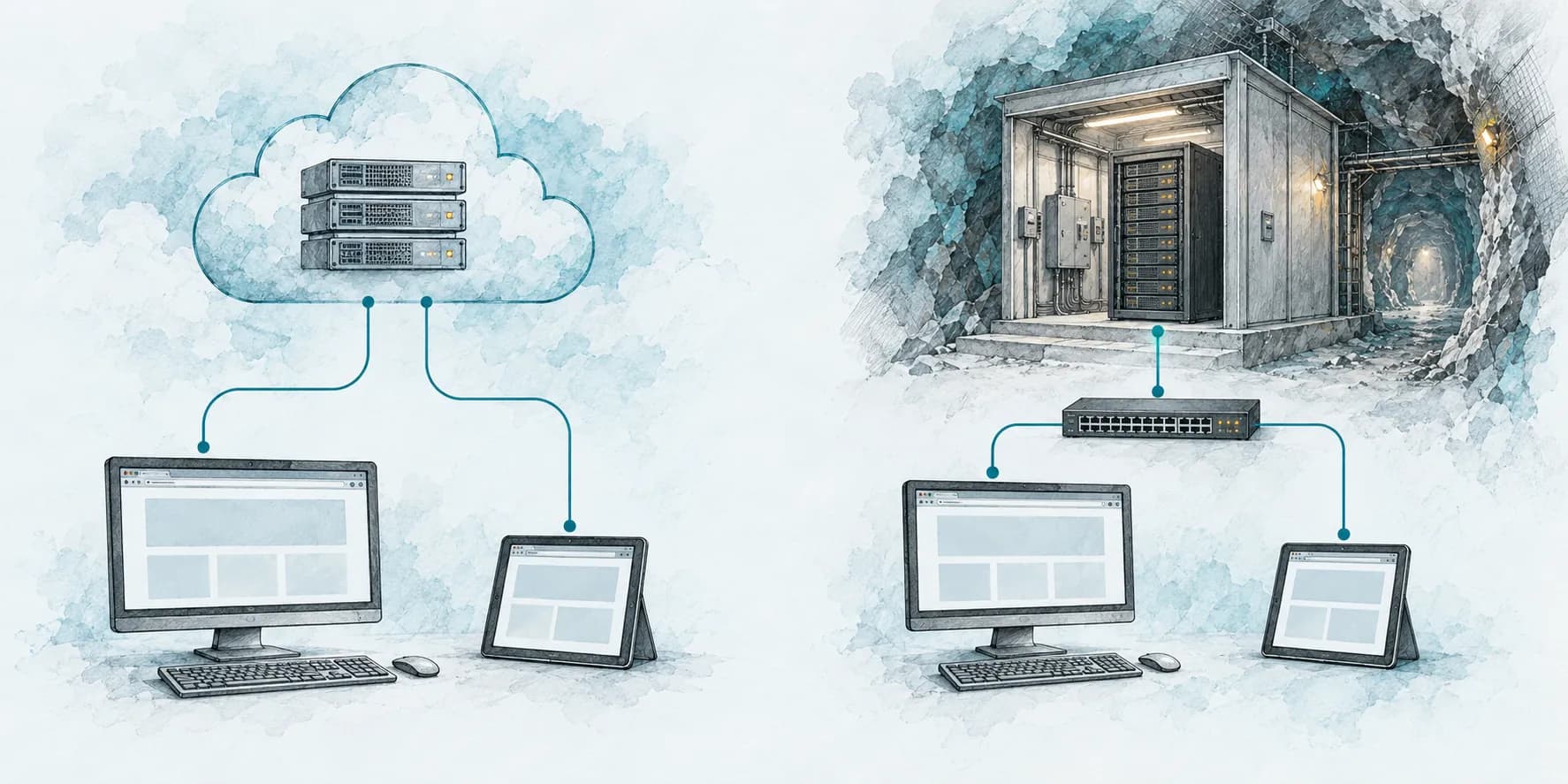
Run on cloud infrastructure, with hosting passed through at cost. Crews connect through a browser on a computer or tablet.
Installed on local servers and used through your intranet. Keeps working if the site's internet link goes down.
Every screen follows site access and role permissions.
Allowed and refused actions are both recorded.
Your security team can review every line.
You own everything built for you and all of your data.
Bring your own AI keys. Proposed changes always wait for a person.
SSO, encryption and backup policy set to your IT requirements.
Pricing
Every site starts with a fixed-price discovery. You get a scope report and a fixed price for each phase before build work begins, and you can stop after discovery. AI usage and hosting are passed through at cost, or bring your own keys and servers.

We'll walk you through a real day on site: on the tools as a technician, with the crew as a supervisor, and across the sites as a manager.
Book a guided demoBook a guided demo
Tell us a little about your site. We'll walk you through the software and talk about what fitting it to your operation would involve.
Prefer to talk now? This line goes straight to Andy or Graham.
(368) 380-1262Questions
It works today: work orders, labour booking, Dispatch, the AI assistant, offline hours, permits, approvals, costs and reporting. The build configures it to your workflows and connects it to your systems.
Discovery is a fixed price, credited toward the build. Build phases are priced after discovery, before any work starts. After go-live, annual support covers updates, fixes, minor changes and direct support. AI usage is billed at cost, or bring your own keys.
No. Kimberlite runs alongside your current CMMS during the build, so operations aren't disrupted. Your old system is switched off at cut-over, once your crews are ready.
That's what it's designed for. Plain language, big buttons, two-tap entries and dictation mean a technician can pick it up quickly, without a manual. We train your crews as part of handover.
Us. There's no ticket queue or call centre. The support number goes straight to Andy or Graham.
Everything built for you, including configuration, workflows and integrations, and all of your data. The core platform is licensed to you perpetually and irrevocably, on your servers or in the cloud, with its source code held in escrow.
Yes. It runs on your site network or in the cloud, with the same browser interface either way.